Integration
Do the following to integrate the functionality:
- Create an instance of the RealTimeScope function block in the User_PRG program and provide a ring buffer for logging:
FbScope:SEW_RealTimeScope.RealTimeScope;
xInitDoneScope:BOOL;
arScopeBuffer:ARRAY[0..524287] OF REAL- In the Init action in the User_PRG program, initialize the RealTimeScope function block and assign the recording channels as well as the basic settings for the measurement. The following code block shows an example of the initialization of the RealTimeScope function block in the Init action of the User_PRG program as well as the assignment of the recording channels and the basic settings for the measurement:
//Initialization of function block
IF NOT xInitDone THEN
xInitDoneScope:=FbScope.Init(
prBuffer:=ADR(arScopeBuffer),
diBufferSize:=ANY_TO_DINT(SIZEOF(arScopeBuffer)),
diCycleTime:=ANY_TO_DINT(gc_uiTaskCycleTime));

//Default settings of the scope measurement
//Channel assignment
FbScope.MapChannel(0,ADR(rVltgDcLink),'Volt.DC-Link [V]');
FbScope.MapChannel(1,ADR(rPwrMDP),'Power MDP [kW]');
FbScope.MapChannel(2,ADR(rPwrAxis1),'Power Axis1 [kW]');
FbScope.MapChannel(3,ADR(rVelAxis1),'Veloc. Axis1 [rpm]');
//Label in the time column in the .csv file
FbScope.SetTimeCaption('Time[ms]');
//Activation of the measurement channels
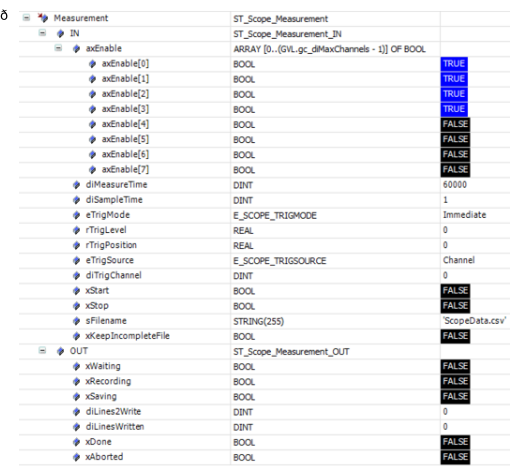
FbScope.Measurement.IN.axEnable[0]:=TRUE;
FbScope.Measurement.IN.axEnable[1]:=TRUE;
FbScope.Measurement.IN.axEnable[2]:=TRUE;
FbScope.Measurement.IN.axEnable[3]:=TRUE;
FbScope.Measurement.IN.axEnable[4]:=FALSE;
FbScope.Measurement.IN.axEnable[5]:=FALSE;
FbScope.Measurement.IN.axEnable[6]:=FALSE;
FbScope.Measurement.IN.axEnable[7]:=FALSE;
//Trigger settings
FbScope.Measurement.IN.eTrigSource:=
SEW_RealTimeScope.E_Scope_TrigSource.Channel;
FbScope.Measurement.IN.diTrigChannel:=DINT#0;
FbScope.Measurement.IN.eTrigMode:=
SEW_RealTimeScope.E_Scope_TrigMode.RisingEdge;
FbScope.Measurement.IN.rTrigPosition:=0.25;
FbScope.Measurement.IN.rTrigLevel:=500;
//Time base settings
FbScope.Measurement.IN.diMeasureTime:=DINT#5000;
FbScope.Measurement.IN.diSampleTime:=DINT#1;

//Default settings of the control inputs
FbScope.Measurement.IN.xStart:=FALSE;
FbScope.Measurement.IN.xStop:=FALSE;

//Name of the .csv file
FbScope.Measurement.IN.sFilename:='ScopeData.csv';

//Result of the Init action of the User PRG
xInitDone:=xInitDoneScope;
END_IF- In the Main action of the User_PRG program, call the CallMain method of the instance of the RealTimeScope function block:
FbScope.CallMain();- In the HighPrio action of the User_PRG program, call the CallHighPrio method of the instance of the RealTimeScope function block:
FbScope.CallHighPrio();
- When you log on to the controller, you can now display the variables by double-clicking the User_PRG program in the device tree under the instance of the RealTimeScope function block: