Saving/sending an archive
Bear in mind the following information when using this function:
- The current IEC project is saved in an archive file together with the libraries.
The following dialog opens:
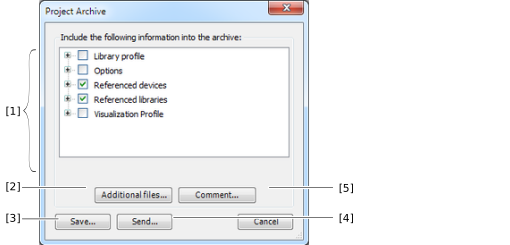

[1] | Select the content you want to save. |
[2] | Append additional files. |
[5] | Add a comment. |
[3] | Save the IEC project archive with the specified settings. A dialog opens where you can specify the storage location. |
[4] | Send the IEC project archive with the specified settings. An e-mail opens with the IEC project archive file as attachment. |
